TRIARE approach: UI/UX design development cycle


If you’re looking for UI/UX solutions, you’re on your way to improving your brand’s online presence and user experience. This journey is all about being creative, trying new things, and staying flexible.
But the real win is when you mix good looks with usability. It’s like a cool fusion where innovative design meets user-friendly functionality, making sure your product stands out and works smoothly too!
In this article, we’re breaking down the UX/UI design process step by step. Plus, we’ll spill the beans on how TRIARE crafts slick websites and apps that are both modern and super user-friendly.
What is a UI/UX design development process?
The UI/UX design development process is a systematic journey that harmonizes user needs, technological capabilities, and aesthetic appeal. It’s the art of crafting digital experiences that seamlessly fuse form and function, captivating users while achieving business objectives.
This process involves understanding user behaviors through research, translating insights into intuitive interfaces through wireframing and prototyping, and finally, refining designs based on user feedback. It’s a dynamic cycle of creativity, empathy, and innovation, continually evolving to meet the ever-changing landscape of user expectations and technological advancements.
Things to know before you begin the UI/UX design
Before diving into UX/UI design, you might consider seeking expert guidance for the steps ahead—especially if you’re not the designer yourself. It’s natural to believe that an exceptional team will bring your project to life, yet there are actions you can take on your end before initiating the design process.
First of all, think about what you want crafted—is it an app or a web platform? And most importantly, why does this creation need to exist? Who’s the target audience, and what business challenges will this solution tackle?
What particular features or functionalities do you foresee for your product? Outline both the essential must-have elements and those desirable nice-to-have additions. This detailed list will serve as a roadmap, guiding the design process towards fulfilling your envisioned functionalities.
Furthermore, ask yourself what expectations you have from the design service provider. How much do you want to team up with them? How often do you want updates or chats? And what specific stuff are you hoping they’ll deliver? This info helps set mutual expectations and ensures a smoother working relationship throughout the design journey.
Why is it so important to design specifically for customer needs? Cases from our experience
Here at TRIARE, our focus is on custom design development.
We believe custom development is crucial as it tailors solutions to precisely fit customers’ needs, accommodating specific niches, regions, budgets, and customer expectations. Our design team is here to help improve features for a better user experience, setting your brand apart from competitors using standard solutions.
Here are some examples from our practice that can prove how important it is to design with users in mind:
- Layer Media. A San Francisco-based agency specializing in promotional materials, teamed up with TRIARE to redesign their website. Our challenge lay in finding the right balance between showcasing their content and ensuring the website’s performance remained top-notch.
We prioritized what mattered most to our customers—responsiveness, accessibility, and speed. The outcome was more than a website; it was a bespoke solution perfectly crafted to meet their unique aspirations.
- InfoIMAGE. In a dynamic collaboration with a leading provider of paper and electronic statements, TRIARE made a website transformation journey, breathing fresh life into its online identity.
Our strategy was clear—customize every detail to align with their specific challenges. The outcome? A visually captivating, user-centric website that not only wowed visitors but also supercharged user engagement and conversion rates.
How do we develop our UX/UI designs?
At TRIARE, our journey with you begins by diving deep into your business objectives. We’re all ears to understand your vision, your aspirations, and your unique needs. We’re not just here to design an app; we’re here to create a digital masterpiece that aligns perfectly with your goals.
Our UX/UI team is equipped to handle various facets of your app development journey. Whether you’re starting from scratch, need to revamp an existing product, or want to redefine your app’s brand identity, we’re ready to roll up our sleeves.
Here is how we do it:
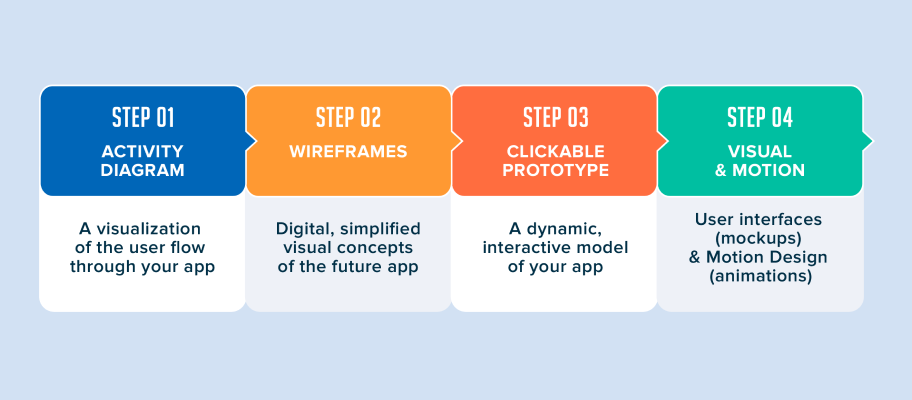
Step 1. Activity diagram
To kick things off, we employ activity diagrams—a visual roadmap that showcases the user’s journey through your app. It’s our secret sauce, placing your users at the core of every design decision we make. These diagrams aren’t just drawings; they’re crafted schemas designed to bring your app’s experience to life.
Step 2. Wireframes
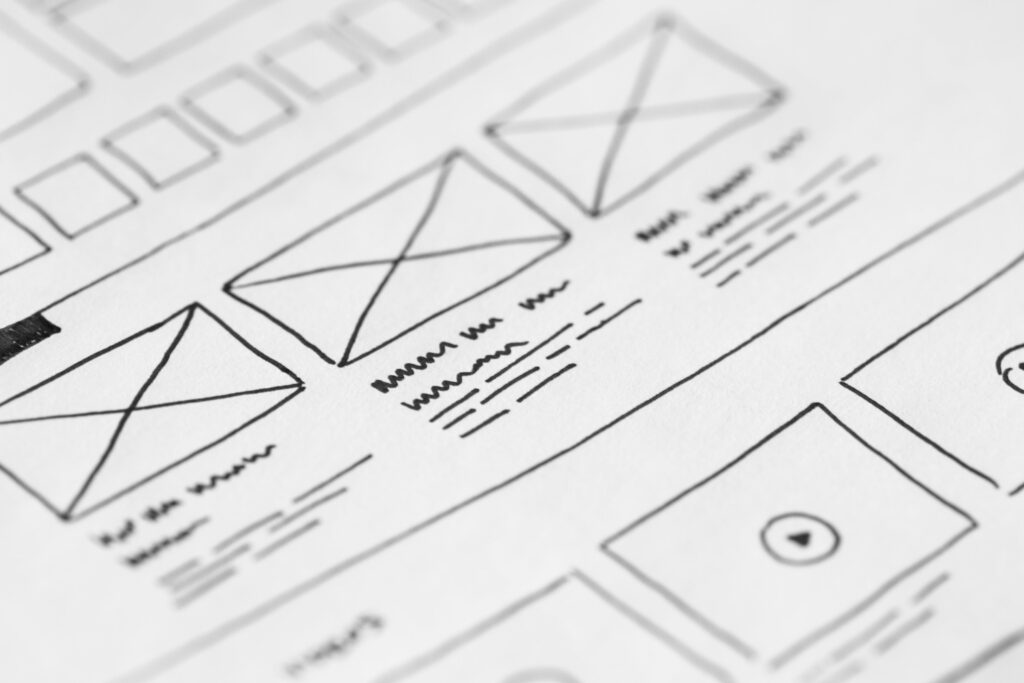
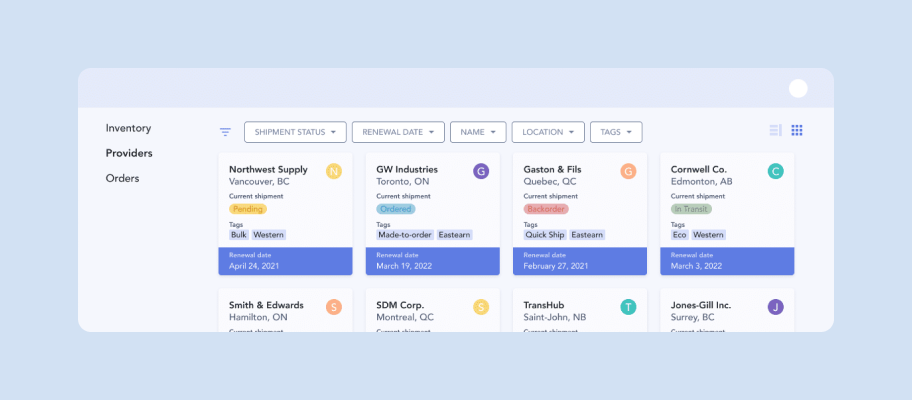
Next up, we delve into wireframes—simplified digital blueprints that offer a glimpse into your app’s future. These visualizations illustrate how different elements of your app will look and interact with each other. It’s the skeleton on which your app’s functionality and user experience are built.
Step 3. Clickable prototype
We bring your app to life with clickable prototypes—a dynamic, interactive model that allows you to test drive the designs before they’re set in stone. These prototypes, crafted from the wireframes mentioned earlier, provide a realistic preview, giving you the power to offer valuable feedback and fine-tune the designs.
Step 4. Visual & motion design
We thoroughly curate fonts, colors, icons, and shapes to elevate your app’s visual appeal. But why stop there? We add the cherry on top with animations and screen transitions, injecting an extra dose of delight and engagement into your app’s user experience.
What crucial features should a good UI/UX design include?
We believe that UI/UX design is about understanding users’ needs and what the business wants. It’s about making products better so that people like using them more.
These are the UI/UX fundamentals that distinguish a well-designed website:
Simplicity and consistency
Crafting a pro web design means harmonizing current trends, techniques, and best practices while prioritizing user experience (UX) and user interface (UI) convenience. A good web design boasts easy navigation, an intuitive interface, and uniform content. Instead of causing users to ponder, it addresses their needs and provides solutions.
Responsiveness and accessibility
These two aspects are the fine line between a design that sells and one that doesn’t. A responsive web page design guarantees a seamless user experience across devices, including smartphones, tablets, and smartwatches. Inclusivity goes beyond that, ensuring content reaches a diverse audience.
Clean and professional code
Well-structured code ensures faster loading times, smoother interactions, and fewer technical glitches, all of which contribute to a seamless user experience. When the code is clean, developers can more easily implement design elements, leading to better alignment between the intended user interface and the actual user experience.
What are the key elements of a strong web design backend?
Strong infrastructure
An effective backend design relies on a strong foundation—a scalable infrastructure that doesn’t buckle under increased user demands. This setup not only handles more users but also allows for growth without causing any slowdowns or performance issues.
Following best practices
By following industry standards and using smart coding techniques, the backend system stays consistent and easy to manage. It’s like using a common language that ensures everything works smoothly together, making maintenance simpler and compatibility a given.
Quality assurance
Our QA team dedicates effort to performing tests that gauge how fast and efficiently the entire system operates. This focus helps us guarantee a stable and reliable backend. Detecting and fixing issues early on contributes significantly to building a system users can depend on without worries.
Technical specifications and prototype. Why is this a must-have when developing a design?
When creating something new, having clear technical instructions and building a prototype are essential steps.
First, technical instructions outline exactly what needs to be done—like a detailed plan—to ensure everyone’s on the same page. They cover what the design should do, what technologies to use, and how it should perform.
Then comes the prototype, a working model of the design. It’s like a test version that lets you see how things actually work in real life. Making and testing prototypes helps find and fix any problems early on before the final product is made.
So, these two—technical instructions and prototypes—work hand in hand. Instructions set the rules, while prototypes bring those rules to life and help perfect the design. Together, they make sure everything runs smoothly, and the end result works as intended.
What is a unique page and why is it important for each such page to have a unique layout?
A unique page within a website serves as an exclusive gateway to specific themes, products, or services, providing a focal point for targeted information. Making sure each of these unique pages has its own special layout is super important for:
User experience
Different content demands different user interactions. A layout designed specifically for a page’s content ensures a smoother and more intuitive user experience. Users expect consistency but also appreciate tailored experiences that cater to their specific needs on each unique page.
Visual hierarchy
Layouts establish a visual hierarchy, guiding users through the content hierarchy. A unique layout allows designers to emphasize critical elements, direct attention where needed, and maintain a logical flow for the particular information presented on that page.
Optimization and conversion
Tailoring layouts based on the page’s objective can improve conversion rates. For instance, a landing page designed specifically for a marketing campaign might have a layout optimized for conversions, guiding users toward a specific call to action.
What tools do we use to develop a design layout?
Crafting design layouts involves a world of tools, and the ones UI/UX designers choose depend on what they like, how their team works together, and the unique needs of each project.
Here are some cool tools TRIARE UI/UX designers often use:
- Figma. It allows multiple UI/UX designers to work together seamlessly on designs, which is crucial for our team’s efficiency and quality output. The platform specializes in prototyping and building design systems.
- Sketch. We use Sketch for its simplicity and powerful tools. It helps us efficiently create high-quality interfaces and digital assets, streamlining our design process for excellent UI/UX solutions
- Adobe Illustrator. It enables us to create illustrations, logos, icons, and detailed vector art. It effortlessly adjusts to accommodate our varied design workflows.
- Adobe Photoshop. Our designers use it for its powerful photo editing capabilities. It’s valuable for creating and refining visual elements in design layouts.
- Balsamiq. We choose it because it’s tailored for wireframing and low-fidelity prototypes. Its easy drag-and-drop interface helps us quickly create wireframes, making our design work faster.
- Axure. A prototyping tool, it facilitates the creation of interactions and prototypes. It’s instrumental in developing interactive wireframes, prototypes, and user flow simulations.
- Zeplin. It acts as a bridge between design and development. It allows our designers to easily share design specs, assets, and style guides with our development teams, streamlining collaboration between the two.
- Miro. Although it’s mainly a collaborative whiteboarding tool, it facilitates our design team’s collaborative brainstorming, user journey mapping, and the creation of design-centric diagrams.
How do we approve finished design layouts?
Approving the final design layout is a bit like putting together a puzzle. It’s a structured process that ensures we meet the requirements and goals set for the project.
Here’s how we do it:
The design team and stakeholders review the layout, ensuring alignment with goals, brand guidelines, and the target audience. We ensure the layout works seamlessly by testing its navigation, interactive elements, and adaptability across devices. This step guarantees an excellent user experience.
We also verify that the text, images, and multimedia content sync perfectly with the intended message, rectifying any discrepancies or errors along the way.
Gathering inputs from stakeholders helps us fine-tune the design through multiple rounds of revisions. Constructive criticism and suggestions drive iterative improvements.
The final review includes a thorough check to ensure the design meets both aesthetic and functional criteria before moving to the implementation stage. It’s all about making sure the design isn’t just good-looking but also fits perfectly with what we want to achieve.
Conclusion
At TRIARE, our UX/UI designs aren’t just a working process—it’s an adventure with expertise and years of passionate dedication. With an eye for detail and a full-picture approach, our team doesn’t settle for ordinary designs—we craft digital landscapes that exceed expectations.
If you’re up for something amazing, let’s team up and create a design that’s not just cool to look at but also leaves you feeling inspired!